
The 2025 Big Beautiful Bill law put into effect "Trump Savings Account" provisions for the Tax Years 2025-2028. This provision allows the Taxpayer to contribute to a Savings Account and also allows an Employer to Match their contributions up to applicable limits. ($5,000.00 total contribution including Employer matching portion). While the Employee's contributions will not show up in payroll, the Employer's match (up to $2,500.00) WILL need to be entered through Payroll in order to show on their W-2. To make this entry, follow the steps below.
- Create a new Deduction/Benefit named "Trump Acct Employer Match"
(the Deduction/Benefit name must include "Trump" and "Employer" in order to be included on the W-2)
After creatng the Deduction/Benefit, unselect ALL taxes (both State and Federal)
by Double-clicking the "Applies:" column title.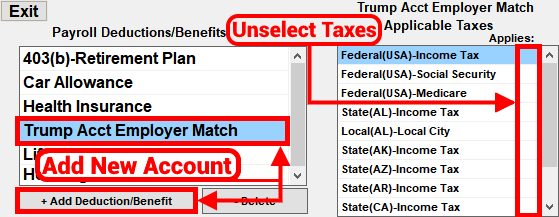
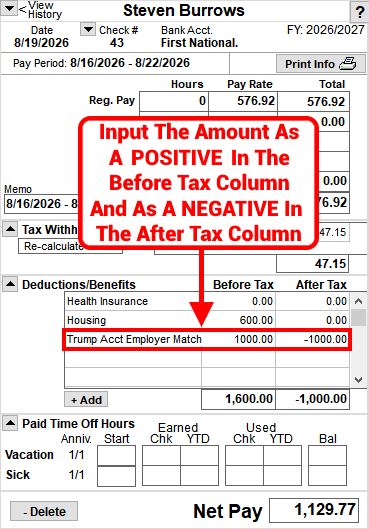
- Then, add the Deduction/Benefit to the next applicable payroll by posting the amount in the Before Tax column and then as a NEGATIVE in the After Tax column.
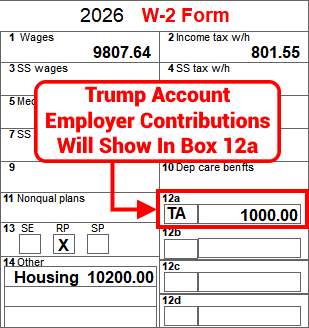
- After completing these steps, the Trump Account contribution will appear on the Employee's W-2 with the code "TA" in box 12.
Related Topics:
- "No Tax on Overtime" provision
- How to print Forms W-2 and W-3 [VIDEO] [TEXT]
- Then, add the Deduction/Benefit to the next applicable payroll by posting the amount in the Before Tax column and then as a NEGATIVE in the After Tax column.


Can't find what you are looking for?
Click here to submit your question, contact us at
mail@ntssoftware.com or call us at (817) 318-0303.